In designing AI agents on the Latenode.com platform, there are two main architectural approaches to working with tools and logic routing. Both approaches are valid but applicable in different situations. Let’s take a closer look.
Approach 1: Tool-Centric - all logic inside the agent
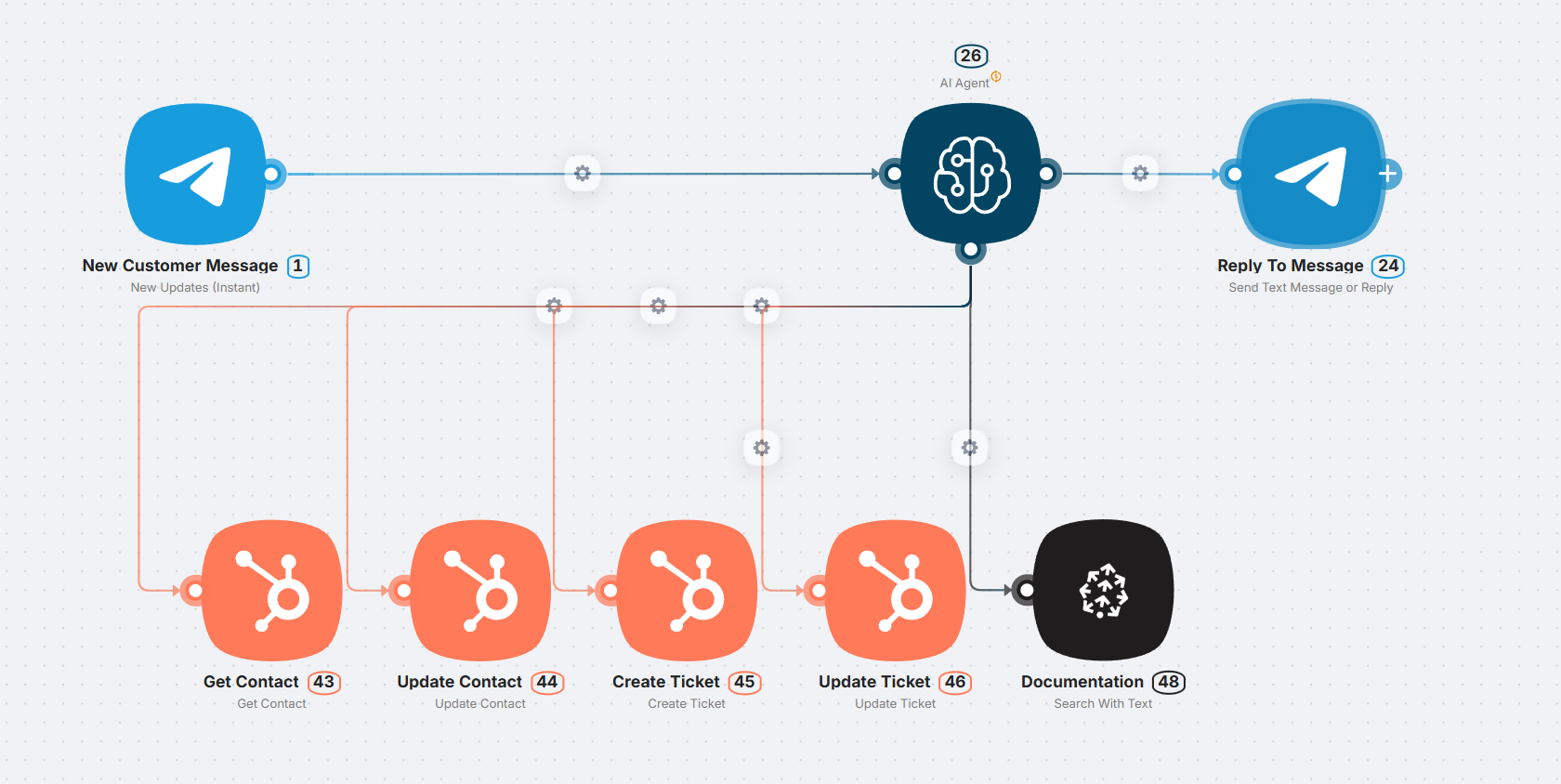
Concept:
The agent receives input, determines the logic on its own, calls the connected tools, and generates a final response. All logic occurs within the agent.
Pros:
- Simple to implement
- Minimal external logic - everything is handled inside a single agent
- Ideal for MVPs, pilot projects, and simple assistants
Cons:
- Very high prompt quality requirements - the prompt must describe the agent’s behavior in great detail for all situations
- Potential for AI hallucinations - when the agent chooses not to follow instructions or behaves unpredictably
- Poor control - hard to validate, log, or reuse steps
- Low transparency - difficult to trace what actions were taken
- Scaling and integration challenges with external systems
Example use case (screenshot above): A customer support bot with a full set of tools inside the agent:
Get Contact- fetch customer dataUpdate Contact- update customer dataCreate Ticket- create a ticketUpdate Ticket- update ticket statusDocumentation- search documentation
A customer writes “I want to change my email.” The agent sequentially calls all the necessary tools and sends a complete response via Reply To Message.
Approach 1.5: Sub-Agent Orchestration
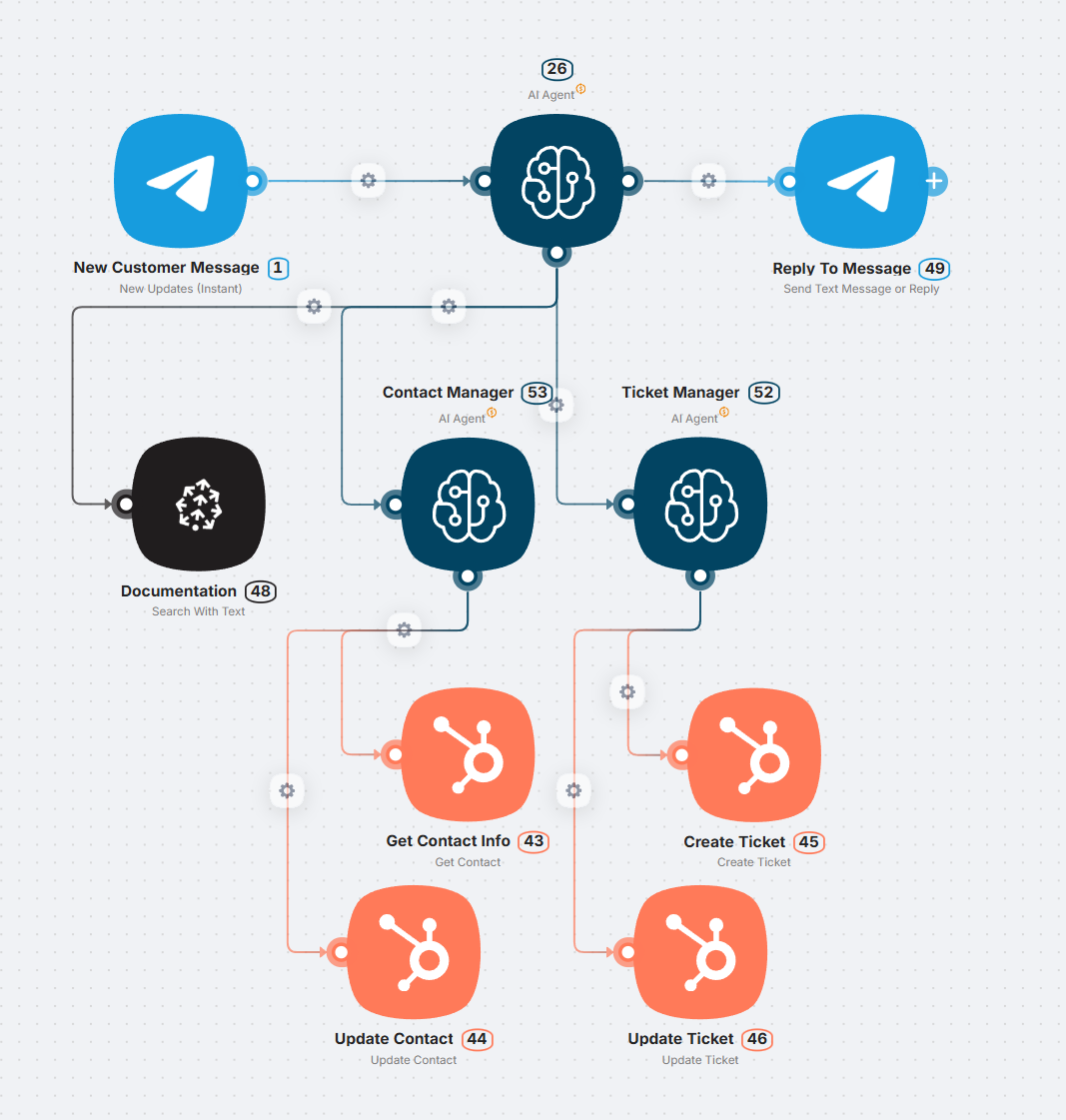
Concept:
The main agent calls specialized sub-agents that handle specific tasks. For example, the account management agent only has access to Get Contact Info and Update Contact, while the ticketing agent can use Create Ticket and Update Ticket, and so on.
Pros:
- Clear role separation between agents
- Lower risk of hallucinations - each sub-agent is specialized
- Modular structure - each sub-agent can be developed independently
- Reusability of sub-agents across multiple scenarios
Cons:
- More complex setup and orchestration
- Additional overhead to coordinate between agents
- Possible issues with context transfer between sub-agents
Example use case (screenshot above):
A customer writes “I want to change my email.” The main agent analyzes the request, determines it relates to contact management, and calls only the Contact Manager (Agent 53). The Ticket Manager (Agent 52) is not involved. The Contact Manager uses its tools (Get Contact Info and Update Contact), completes the task, and returns the result to the main agent.
Approach 2: Tools + JSON Output (Action-Output Routing)
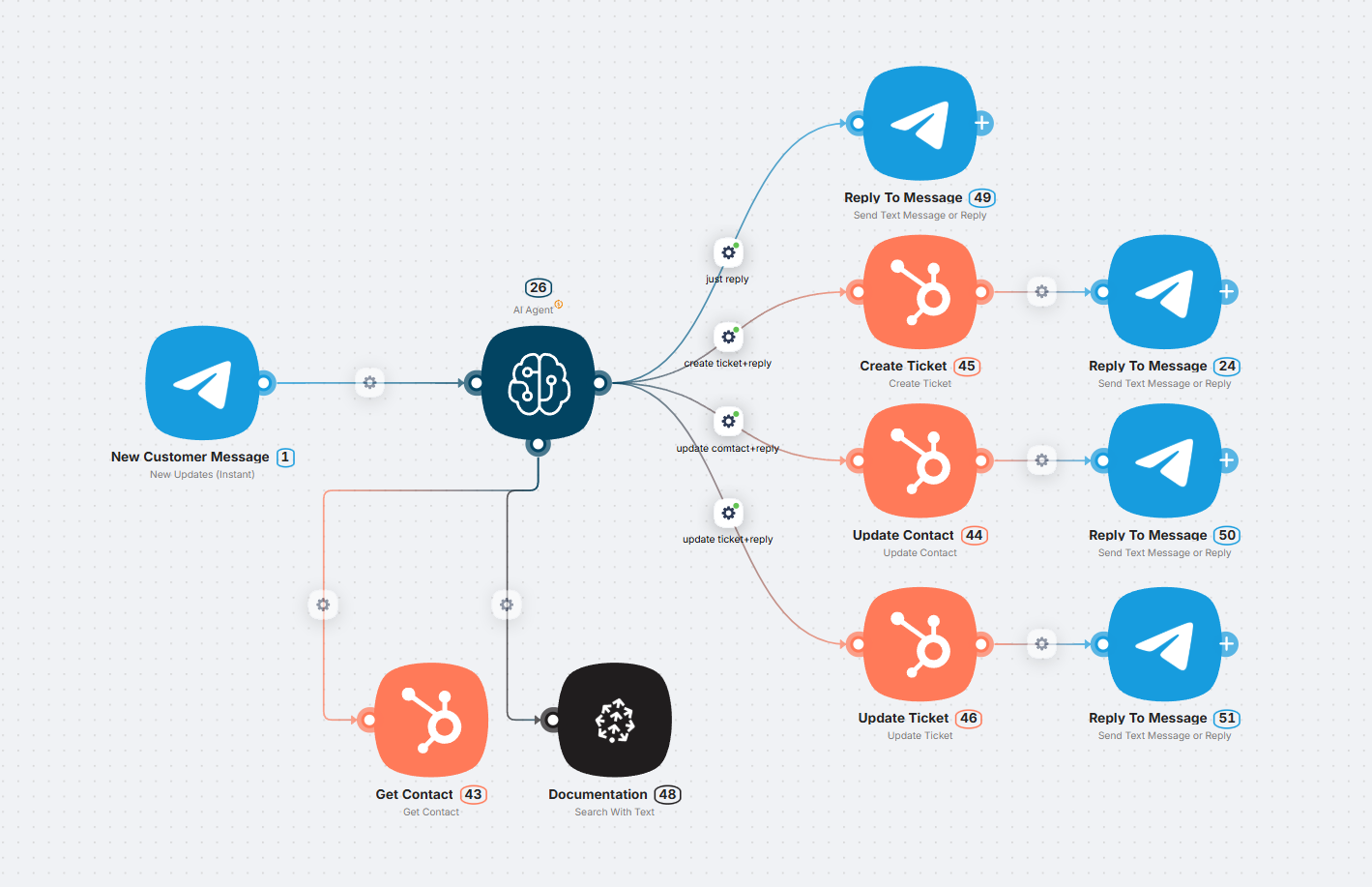
Concept:
The agent receives input, calls the necessary tools (search, databases, HTTP requests, etc.), and then generates a structured JSON containing the response and further action instructions - such as reply, create_ticket, escalate, assign, priority, etc. The platform then routes the actions based on the JSON. This is why agents have a JSON output or JSON schema option - it defines clear expectations, restricts behavior, and enables result validation.
Pros:
- JSON output ensures a consistent response structure and eliminates deviations from the scenario
- High transparency and predictability
- Easier debugging and logging
- Simpler to scale
Cons:
- More logic must be handled within the scenario
- The agent becomes slightly less “intelligent” - its role is to generate actions rather than execute them directly
- Requires greater proficiency with the platform
Example use case (screenshot above): A customer support bot with JSON output and routing:
The agent only has analytical tools:
Get Contact- fetch customer dataDocumentation- search documentation
Operational actions are performed by the platform after the agent:
Create Ticket,Update Contact,Update Ticket- as separate nodes
A customer writes “I want to change my email.” The agent analyzes the situation and returns the following JSON:
{
"reply": "Got it, I'm updating your email",
"action": "update_contact",
"field": "email",
"value": "[email protected]"
}
The platform routes the request to the “Update Contact” node, which performs the update and sends a response to the customer.
The scenario reads the JSON and automatically performs the required actions - creates a ticket, logs the request, replies to the customer, assigns a team, and so on. In this case, the agent did only the “thinking”, while the rest of the scenario handled the execution.
When to Use JSON Output
- When business logic goes beyond a simple chat response
- When structured and predictable output is critical - JSON ensures this
- When managing assignments, escalations, statuses, and tickets
- When transparency, logging, and validation are important
Combined Approach
You can keep some logic inside the agent (like calling tools), but outsource the final decision (action) through JSON. This provides a balance between the agent’s intelligence and platform-level control.
Important: If there’s a tool that needs to be triggered on every run, like loading a user checklist, don’t make the agent handle it manually. It’s better to call the tool ahead of time within the scenario and pass its result to the agent as part of the input.
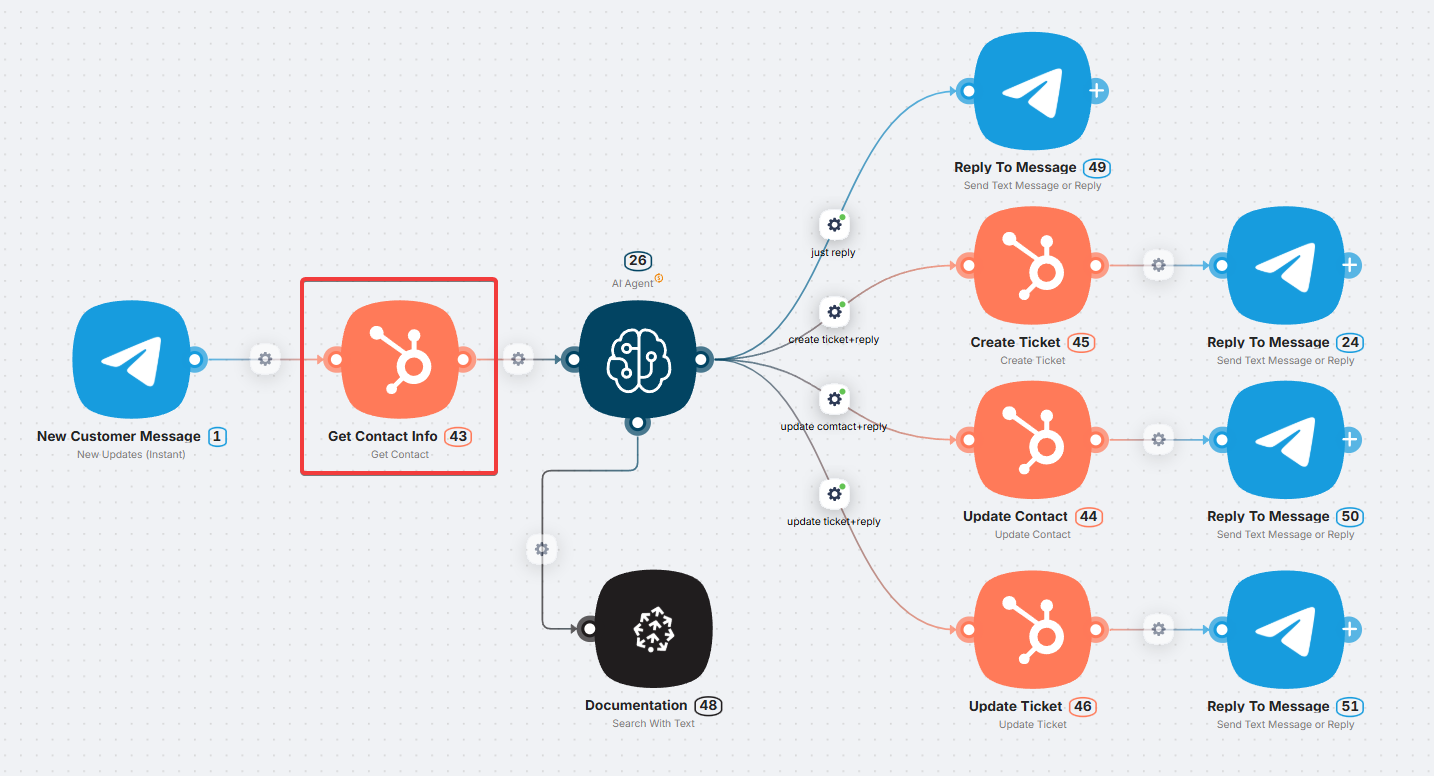
This:
- Reduces unnecessary reasoning overhead for the agent
- Increases stability and predictability
- Simplifies debugging and scaling
It’s also important to understand: if the agent needs to operate freely and flexibly - for example, to explore a problem, make intermediate conclusions, or access various sources - then toolcalls are appropriate. But if the agent is performing a clearly defined business function, like an “embedded employee” in the system, its behavior should be predictable and its actions structured. In such cases, JSON output is preferable.
Conclusion
All approaches are valid, but as complexity and scalability needs grow, JSON output with routing or sub-agent orchestration become the better choice. They are ideal for support tasks, process automation, and integration with CRMs, databases, and teams.