I am attempting to use NVM to set up Node.js, but I encounter an issue when installing a specific version. When I run the command nvm install 14.17.3, it fails to locate the npm file, indicating that the .zip file for npm is missing from the designated folder. Here’s the output from the command line:
C:\Users\Infra>nvm install 14.17.3
Downloading node.js version 14.17.3 (64-bit)...
Complete
Downloading npm...
Creating C:\Users\Infra\AppData\Local\Temp\nvm-install-3421872285\temp
Downloading npm version 6.14.13... Complete
Installing npm v6.14.13...
error installing 14.17.3: open C:\Users\Infra\AppData\Local\Temp\nvm-npm-2947621574\npm-v6.14.13.zip: The system cannot find the file specified.
From my past experience, I faced a similar issue, and after investigating, I found that sometimes it happens due to a corrupted NVM installation. What worked for me was completely uninstalling NVM, deleting any related folders left behind, and then reinstalling it. This ensures no leftover files cause issues. Additionally, make sure that the nvm directory is not being set to read-only, which could interfere with file operations. Give it a try, it might just solve your problem.
It could also help to check your antivirus or firewall settings, as they might be blocking the download of npm. Sometimes security software can block or quarantine files that are completely safe. You could temporarily disable your antivirus and see if that allows the download to complete successfully. Remember to re-enable it afterward to keep your system protected. Furthermore, make sure your NVM setup is updated to the latest version, as newer releases might fix past issues with downloading components.
Try running nvm with admin privileges, might help resolve permission issues. Also, ensure that your internet connection is stable cause nvm needs to download npm from the web. If problem continues, try manually downloading the specified npm version and place it in the nvm’s temp directory before installing.
I’ve encountered this error myself, and something that helped was double-checking the network settings. Sometimes using a VPN or proxy can affect the downloading process as it might reroute connections in a way that prevents the files from being found. Try disabling any VPN or proxy settings temporarily. Additionally, also confirm that your PATH environment variables are correctly set. Incorrect configuration there might cause NVM to not find the necessary files after download.
I had a similar error when installing the old version of nodejs 0.12.2.
I need this version to work with the old version of WebOS 3.4 installed on my TV
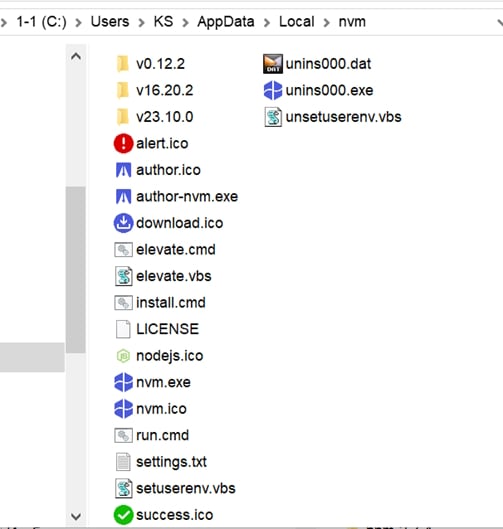
Before that, I already had nodejs versions 23.10.0 and 16.20.2 installed
I downloaded the node-v0.12.2 Win-x64.msi installer from here https://nodejs.org/en/blog/release/v0.12.2 and installed it in the default folder (let’s say it was the C:\nvm4w\nodejs_0.12.2 folder. It doesn’t matter now)
I checked, the nodejs version 0.12.2 was not listed anywhere. I searched and found that versions 23.10.0 and 16.20.2 are present in the folders of the same name C:\Users\KS\AppData\Local\nvm. By analogy, I created a folder v0.12.2 and dropped the contents obtained during the installation of node-v0.12.2 Win-x64.msi into it
The result was as follows:
When unsuccessfully attempting to install Nodejs 0.12.2 with the command
nvm install 0.12.2the file npm-v2.7.4.zip was downloaded to the folder C:\Users\KS\AppData\Local\Temp\nvm-install-3885601035\temp
But for some reason the installer was looking for this file in the folder C:\Users\KS\AppData\Local\Temp\nvm-npm-2168612958. There was such a folder, but it was empty.
I took the file npm-v2.7.4.zip, unpacked it into a separate folder and ran the command nvm use 0.12.2 (this is mandatory!)
In the folder C:\nvm4w\nodejs (the appearance of which changes depending on the version of nodejs used) I created the node_modules folder, in it I created the npm folder, and in it (that is, in the folder C:\nvm4w\nodejs\node_modules\npm) I put all the contents of the npm-v2.7.4.zip archive
Now, when using Nodejs version 0.12.2, everything is the same as when using Nodejs version 16.20.2 and 23.10.0
Accordingly, the command npm -v is executed. For Nodejs version 0.12.2 npm version 2.7.4