I’m running a HubSpot form on my website to collect leads, and since my page is linked to an active Google Ads account, I want to send the email input field to Google Tag Manager. To begin, I embedded the following code in the <head> section of my site:
<head>
    ...
    <script>
        window.dataLayer = window.dataLayer || [];
    </script>
    ...
</head>
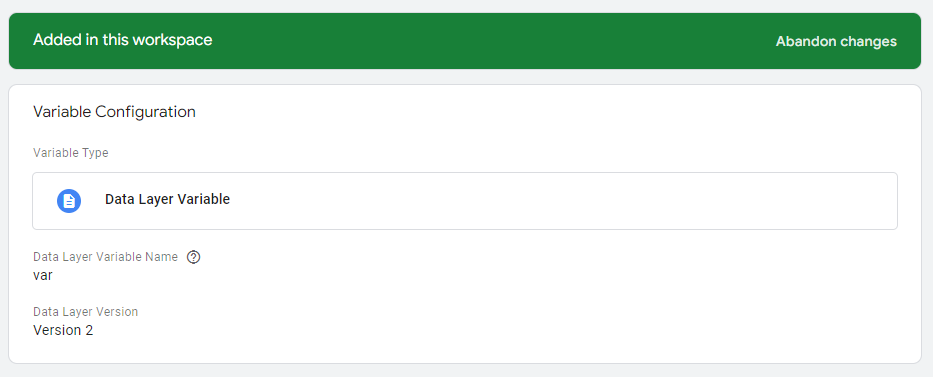
After that, I set up a Data Layer variable in Google Tag Manager as shown below:
Finally, in my HubSpot form, I implemented the onFormSubmitted function, which sends the variable along with the user’s email to Tag Manager:
<script charset="utf-8" type="text/javascript"
    src="//js-eu1.hsforms.net/forms/shell.js"></script>
<script>
    hbspt.forms.create({
        region: "eu1",
        portalId: "xxxxxxxx",
        formId: "xxxxxxxx-xxxx-xxxx-xxxx-xxxxxxxxxxxx",
        onFormSubmitted: function ($form) {
            dataLayer.push({ 'var': String($form.find('input[name="email"]').val()) });
        }
    });
</script>
Even after implementing this code, I noticed that the Google Ads Submit Lead Form Conversion still does not display the email value. What steps can I take to resolve this issue?
Had the same HubSpot/GTM headache. You’re probably pushing a generic ‘var’ key instead of the specific variable name Google Ads wants. Change your dataLayer push to match exactly what your GTM variable expects - something like dataLayer.push({'user_email': String($form.find('input[name="email"]').val())}); where ‘user_email’ matches your Data Layer Variable name in GTM. Double-check your conversion tag uses the right enhanced conversion parameters too. Google Ads enhanced conversions are super picky about field mapping, so make sure your GTM variable name matches what the Google Ads tag expects.
Sounds like a jQuery timing issue - hubspot forms sometimes load before jQuery’s ready. try wrapping your email selector in a timeout: setTimeout(() => { dataLayer.push({'var': $form.find('input[name="email"]').val()}); }, 100); this gives the form elements time to render before you grab the email value.
your datalayer push is probably firing too late - after the conversion tag already triggered. try adding a delay to the conversion tag or set it to fire on the datalayer event instead. first tho, check gtm preview mode to see if the data’s even showing up there.
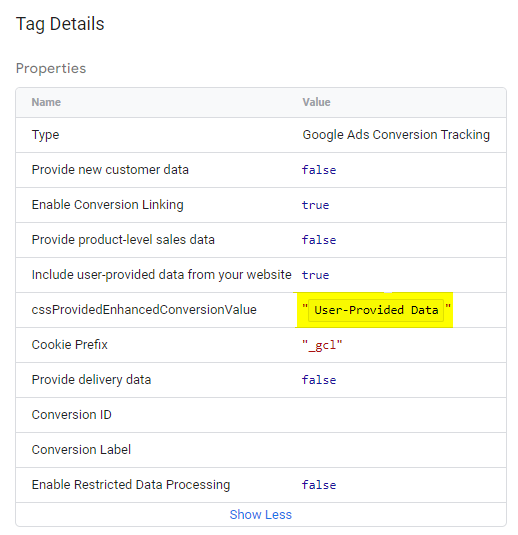
Check if your Google Ads enhanced conversions tag can actually accept the email parameter. Had this exact issue last month - dataLayer was pushing fine, but the conversion tag wasn’t even set up for enhanced conversions. Go into your Google Ads account and make sure enhanced conversions is turned on for your conversion action. Then check your GTM conversion tag has the enhanced conversions box checked and customer data parameters configured right. Also try testing with a custom event name in your dataLayer push like dataLayer.push({'event': 'hubspot_form_submit', 'user_email': emailValue}); and trigger your conversion tag on that specific event instead of relying on timing.
Skip the headache and automate the whole pipeline.
I’ve dealt with this exact HubSpot to Google Ads mess before. The problem isn’t just dataLayer timing or variable naming - you’re building a fragile chain that breaks whenever HubSpot updates their form API or Google changes their conversion requirements.
Now I set up automation that captures HubSpot form submissions in real time and pushes them directly to Google Ads enhanced conversions API. No more dataLayer timing issues, no more manual JavaScript debugging, no more wondering if conversions actually fired.
The automation handles field mapping automatically, retries failed submissions, and gives you proper logging so you can see exactly what’s happening with each conversion. Plus it works regardless of ad blockers or JavaScript errors that might break your frontend tracking.
I’ve been running this setup for months and conversion tracking accuracy went from maybe 70% to nearly 100%. Way more reliable than trying to coordinate three different systems through browser JavaScript.
Set this up once and forget about it: https://latenode.com