I’m working on an Android project and noticed that my app is showing deprecation warnings when I compile it. The issue seems to be with the Resources.getColor(int id) method that I’m using to get color values from my resources.
Here’s the code that’s causing the warning:
@ColorInt
@Deprecated
public int fetchColorValue(@ColorRes int resourceId) throws NotFoundException {
    return fetchColorValue(resourceId, null);
}
I’m targeting Android Marshmallow and higher versions, so I need to find the right way to handle this deprecation. What’s the recommended approach to replace this deprecated method? I want to make sure my code works properly across different Android versions without getting these compiler warnings.
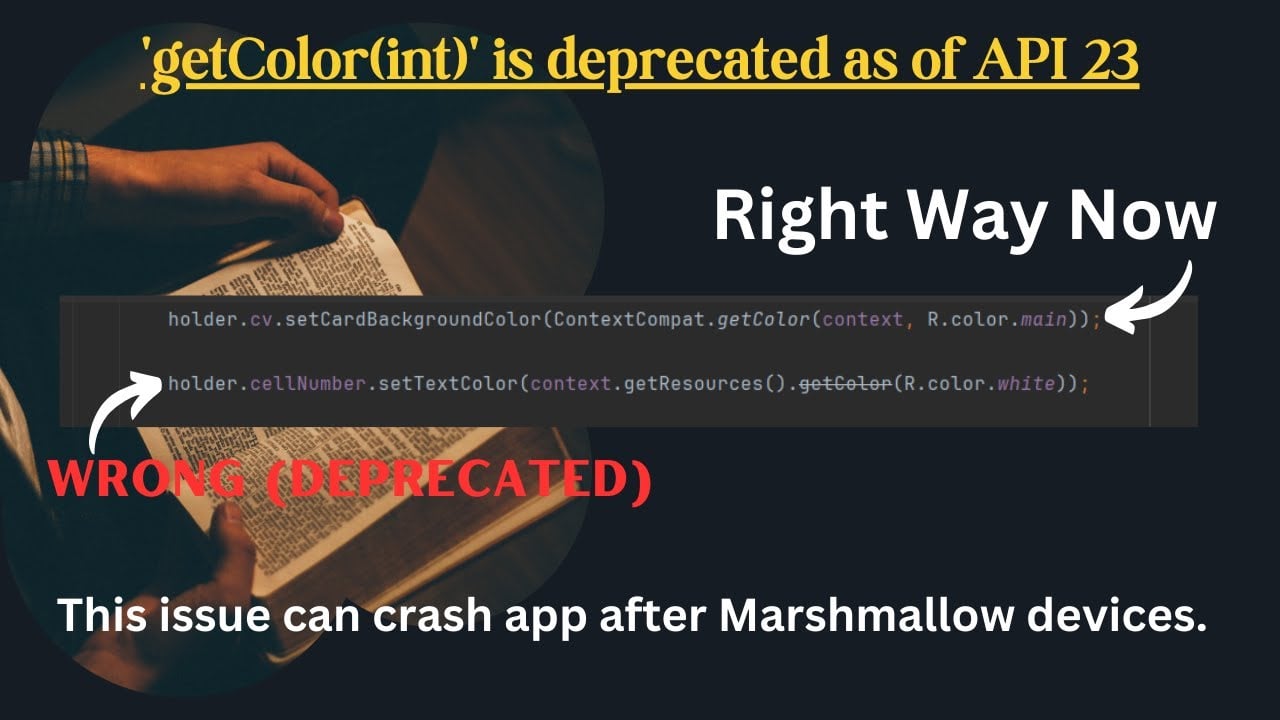
API 23 deprecated it because they added theme-aware colors. The old method couldn’t handle different themes properly. I’ve run into this in multiple projects - here’s what works best. If you’re in an Activity or Fragment, just use ContextCompat.getColor(this, R.color.your_color) from the support library. It handles all the backward compatibility for you. When you only have Resources, use the two-parameter version: resources.getColor(R.color.your_color, context.getTheme()). You can pass null for the theme to get the default. Heads up - the new method actually returns different colors based on your current theme, which is intentional. Double-check your colors still look right after switching, especially with dark/light theme setups.
ContextCompat’s cleaner since it handles API checking automatically.
Honestly though, tracking these Android API changes manually gets old fast. I automated color resource management using Latenode. It watches my resource files and generates proper API-compatible code based on target SDK versions. Way less hassle than chasing every deprecation across Android versions.
Set up a workflow that monitors your color resources and auto-generates the right getter methods. Saves tons of time managing multiple Android projects.
This deprecation warning destroyed a major release for me last year. Google changed it because the old method completely ignored theme contexts.
Quick fix: switch to ContextCompat.getColor(context, colorResId). It’s in AndroidX and handles all the API level stuff automatically.
Stuck with Resources? The new signature is getColor(int id, Theme theme). Pass your activity’s theme or null for default.
Here’s the gotcha that got me - double-check your colors actually look right after switching. The new method respects theme attributes, so you might get different colors in dark mode or custom themes.
I always do a quick visual check across different device themes after this change. Way better than having users complain about wonky interfaces later.
The Problem: You’re receiving deprecation warnings related to the Resources.getColor(int id) method in your Android project, and you want a solution compatible with Android Marshmallow (API 23) and higher.
TL;DR: The Quick Fix: Use ContextCompat.getColor(context, R.color.your_color_resource) from the AndroidX library. This handles API level differences automatically.
Understanding the “Why” (The Root Cause):
The Resources.getColor(int id) method was deprecated in API 23 because it didn’t handle themed colors correctly. Modern Android uses themes extensively to provide a consistent and customizable user experience (light/dark modes, etc.). The older method couldn’t account for these themes, leading to inconsistent color display across different devices and configurations. ContextCompat.getColor() solves this by correctly applying the current theme.
Step-by-Step Guide:
Add the AndroidX Core Library Dependency: Ensure you have the AndroidX core library included in your build.gradle file. If you don’t already have it, add this dependency:
dependencies {
    implementation("androidx.core:core-ktx:1.12.0") // Or the latest version
}
Replace the Deprecated Method: Find all instances of Resources.getColor(int id) in your code and replace them with ContextCompat.getColor(context, R.color.your_color_resource). context refers to the Context object (e.g., an Activity or Fragment). For example:
// Deprecated code
int color = getResources().getColor(R.color.my_color);

// Replacement code
int color = ContextCompat.getColor(this, R.color.my_color); // 'this' refers to the Activity or Fragment
Rebuild and Test: Clean and rebuild your project. Thoroughly test your application across different devices and Android versions (including light/dark themes) to ensure all colors are displayed correctly.
Common Pitfalls & What to Check Next:
XML Resources: If you’re using colors directly in XML layouts (e.g., android:textColor), they will now also respect themes. Review these resources to ensure the colors look as intended in various theme configurations.
Hardcoded Colors: Be aware that hardcoded color values may no longer produce the expected results if the theme affects the color. Avoid relying on exact color values and instead use color resources defined in your colors.xml file.
AndroidX Setup: Ensure your project is correctly set up to use AndroidX libraries. You may need to migrate your project if you’re still using the older support libraries.
Theme Inconsistencies: After making the change, check for any unexpected color behavior, particularly in dark mode or with custom themes. The new method’s theme awareness might lead to visually different colors.
Still running into issues? Share your (sanitized) config files, the exact command you ran, and any other relevant details. The community is here to help!
yeah, this surprised me too when i updated an old app. contextCompat’s def the right approach, but make sure you’ve got the androidx.core dependency first. one thing everyone missed - if you’re using colors in xml drawables or styles, you’ll need to update those as well since they’ll respect theme changes now.
The theme parameter totally caught me off guard during a client migration. ContextCompat is usually the go-to, but I ran into problems with custom drawable tinting that needed direct Resources access. resources.getColor(colorId, context.getTheme()) worked way better than passing null for the theme parameter. The null approach gave me weird inconsistent results with vector drawables that had theme-dependent colors. Heads up - if you’re supporting pre-API 23 devices, this new theme-aware behavior might break hardcoded color assumptions in older layouts. I had to go through several screens where colors looked fine before but got messed up with proper theme inheritance.
Yeah, everyone’s covered the ContextCompat fix - it works fine. But honestly, chasing Android deprecations across multiple projects is exhausting.
What saved me was automated code scanning that catches this stuff early. I set up a Latenode workflow that monitors my Android projects for deprecated API calls and suggests replacements based on my target SDK.
It scans my code, finds deprecated methods like the old getColor(), and generates the proper ContextCompat replacements. Also checks XML files for theme compatibility issues.
Runs on every commit, so I catch deprecations immediately instead of during release crunch. Way better than trying to remember API changes across dozens of projects.
Saved me tons of manual code reviews and compatibility testing. The automation handles the tedious stuff so I can focus on actual features.
 Understanding the “Why” (The Root Cause):
 Step-by-Step Guide:
 Common Pitfalls & What to Check Next:
 Still running into issues? Share your (sanitized) config files, the exact command you ran, and any other relevant details. The community is here to help!