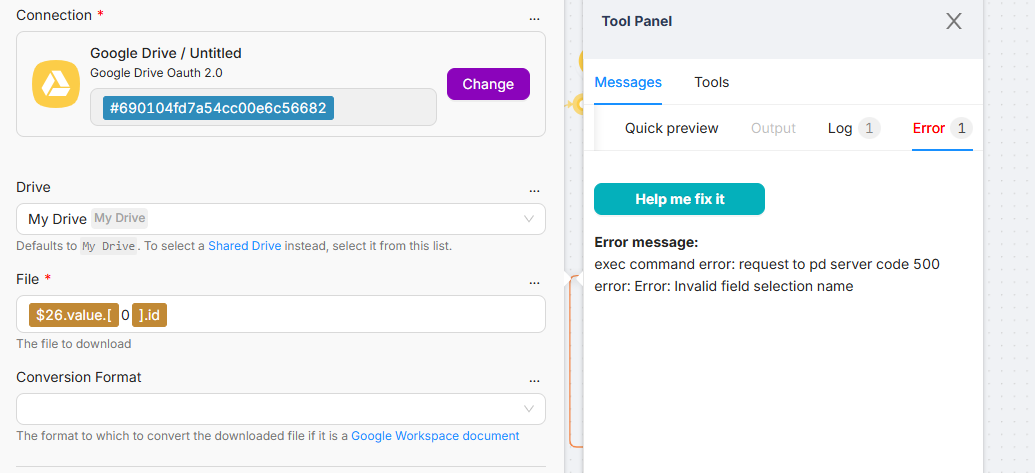
Hello! Have you been able to resolve this issue? As we mentioned to you on Discord, the problem was likely due to an incorrect connection of the iterator (using the right connector instead of the upper one).
This error usually happens because, when everything runs in a loop, some of the data going to the Drive step is missing or incorrect, like an empty file ID or wrong fields value. When you test the Drive step alone, it works because the data is fixed and correct, but in the loop even one bad or empty value can cause it to fail. To fix it, just make sure every item has a proper file ID and avoid using empty or changing fields values so the request stays clean and valid.
Managing file downloads after a loop can be tricky if the iterator doesn’t pass the data correctly. It might be worth checking if the file ID is being correctly captured in the final step.
This usually happens when the loop sends a full object instead of a clean file ID/path to the Drive node. It works standalone because the input is correct, but breaks in batch execution due to mismatched schema.
Fix: explicitly map only the required file identifier (not the whole loop item) into the Drive download node and ensure no dynamic/extra fields are passed.
Looks like that file issue after loops bites a lot of people. I’ve had it happen when the loop spits out an object instead of the raw file ID, so double checking the mapped field usually saves me a headache. If the node shows a weird name, I sometimes run a quick JSON node before it just to force the structure into something predictable.